IGRS Telangana Duty Calculator: Step-by-Step 2026
You register your flat in Kukatpally, walk out of the SRO relieved, file the documents, and move in. Six months later, a Section 47A notice lands at your door — the stamp duty you paid was ₹18,000 short because you selected the wrong property category in the calculator. This scenario is not rare. It happens specifically because buyers calculate duty from WhatsApp-forwarded rate tables or generic formula sheets instead of running the actual transaction through the official IGRS Duty Fee Calculator with the correct deed type and property category. A single wrong dropdown is enough to generate a wrong figure — and an under-stamping chain that can freeze your deed for months. This guide walks through every input field, every deed-type variation, and every real error that produces a wrong output.
What the IGRS Duty Fee Calculator Actually Does (And What It Doesn’t)
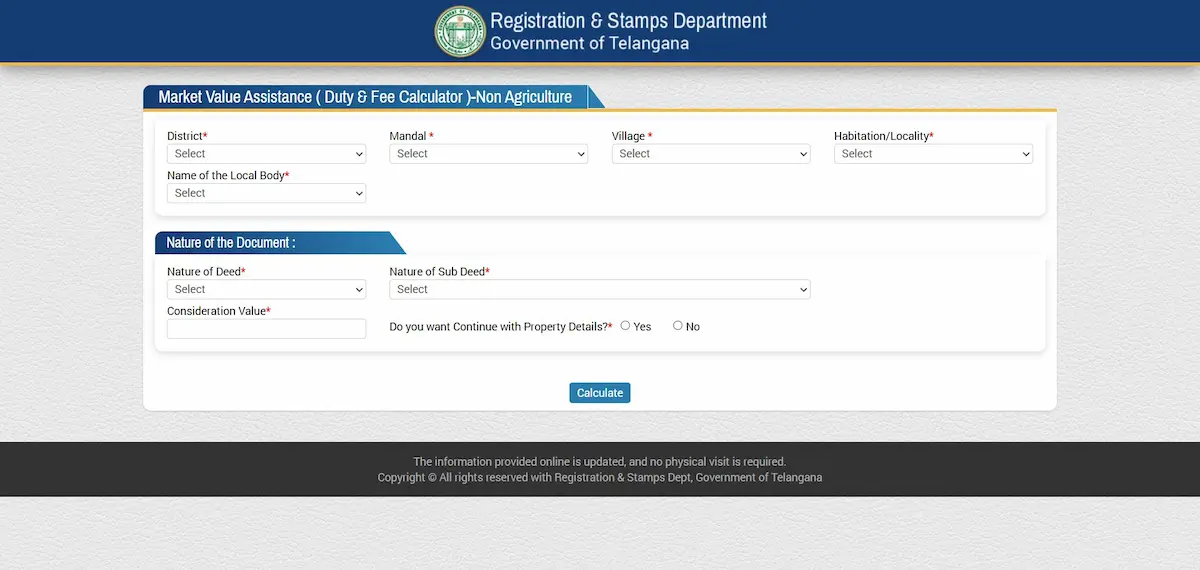
The Duty Fee Calculator at registration.telangana.gov.in/TGMV_Client/NonAgri.htm is the Registration and Stamps Department’s own computation engine. Feed it your deed type, property category, and values — and it returns the exact stamp duty, transfer duty, registration fee, and user charges that the Sub-Registrar’s desk will expect on registration day.
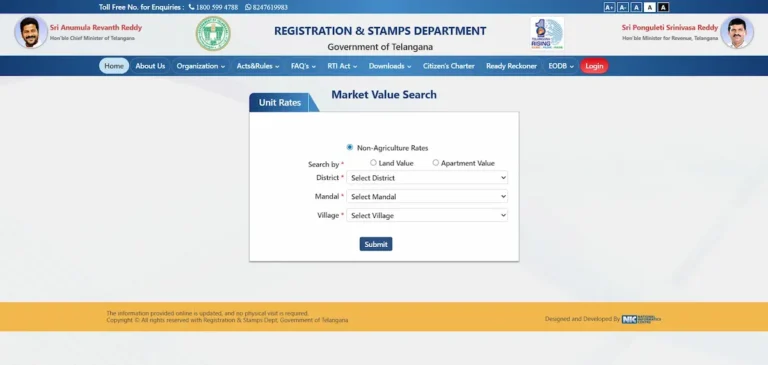
What it is not: it is not the market value lookup tool (that is a separate screen), not a slot booking interface, and not a payment gateway. Many buyers confuse the duty calculator with the market value search. The key difference — the market value tool tells you the government’s minimum benchmark price for your locality; the duty calculator tells you exactly how much government levy you owe on that value. The figure the calculator outputs is what must appear on your e-stamp — not a manually estimated number.
Where to Find the Calculator — Exact Navigation Path
Direct URL: registration.telangana.gov.in/TGMV_Client/NonAgri.htm
The calculator does not require login — no citizen account is needed to compute duty. You only need to authenticate when you proceed to Public Data Entry and payment. On mobile, the portal’s navigation sometimes collapses in a way that hides the Online Services menu; using the direct URL above is more reliable. The URL has been stable since 2022, but always confirm you are on the official .gov.in domain before entering property values.
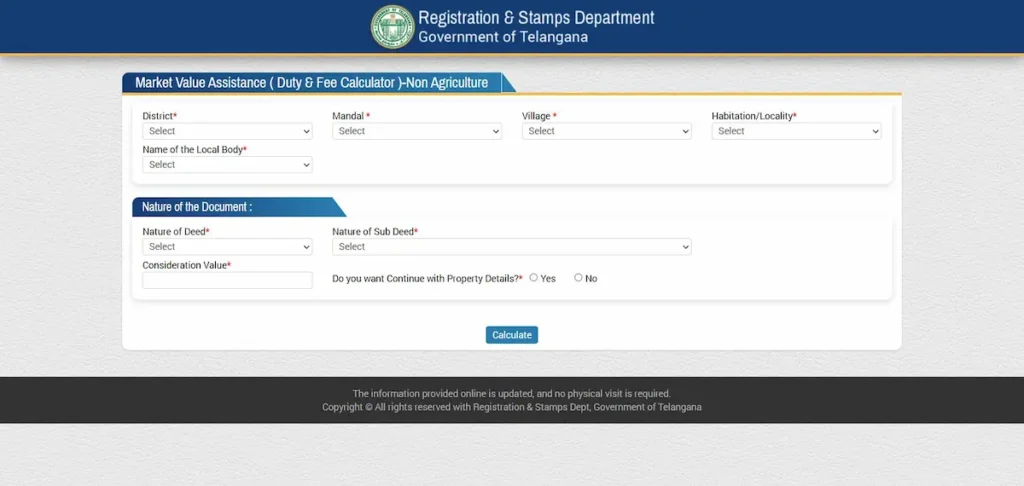
The Calculator Input Fields — What Each One Actually Controls
This is where most under-stamping errors originate. The calculator presents five core fields, and each one directly controls the output.
- 1. Deed / Instrument Type This is the single most consequential dropdown. Duty rates differ sharply by deed type. Selecting “Sale Deed” for what is legally a “Gift Deed” will produce a completely wrong figure. Key 2026 rates by deed type:
| Deed Type | Stamp Duty | Transfer Duty | Registration Fee |
|---|---|---|---|
| Sale Deed (Urban) | 4% | 1.5% | 0.5% |
| Sale Deed (Rural/GP) | 4% | Nil | 0.5% |
| Gift to Spouse/Parent/Child | 1% | Nil | 0.5% |
| Gift to Non-Family (e.g., sibling) | 3.5% | Nil | 0.5% (max ₹1,00,000) |
| Mortgage With Possession | 2% | Nil | 0.5% |
| Mortgage Without Possession | 0.5% | Nil | 0.5% |
| Partition Among Co-heirs | 0.5% | Nil | 0.5% |
| Lease (above 30 years) | 5% | Nil | 0.5% |
| General Power of Attorney | ₹1,000 flat | Nil | ₹200 flat |
- 2. Property Category — Urban vs. Rural Transfer duty of 1.5% applies only inside urban local body limits (GHMC, Municipal Corporations, Municipalities). A property in a Gram Panchayat area does not attract transfer duty. Selecting “Urban” for a GP-area plot inflates your calculated duty by 1.5% — and selecting “Rural” for a GHMC property understates it by the same margin, triggering under-stamping.
- 3. Consideration Value / Market Value The calculator asks for both the price you are paying (consideration value) and the government’s circle rate value for that property. It applies duty on whichever figure is higher. The calculator does not auto-fetch the circle rate — you must look it up separately on the Market Value portal before opening the duty calculator. Entering only the sale price without checking the circle rate is the root cause of most GP-area under-stamping cases.
- 4. Property Type Flat/Apartment, Open Plot, or Independent House. This field affects how the applicable unit is measured and whether any depreciation adjustment applies to older structures.
- 5. Transaction Date Duty is calculated on rates effective on the date of registration at the SRO, not the date of the sale agreement. If the government revises circle rates or duty slabs between your agreement date and your registration appointment, the new rate applies in full.
Worked Examples — Three Property Types, Three Outputs
- Example 1 — Flat in GHMC limits (Kukatpally) Circle rate: ₹5,200/sqft | Super built-up area: 1,200 sqft | Sale price: ₹75 lakh Circle rate value = ₹62.4 lakh. Sale price is higher → duty on ₹75 lakh. Stamp Duty (4%) = ₹3,00,000 | Transfer Duty (1.5%) = ₹1,12,500 | Registration Fee (0.5%) = ₹37,500 Total: ₹4,50,000
- Example 2 — Open plot in Gram Panchayat (Shankarpally Mandal) Circle rate: ₹18,000/sq. yd | Plot: 150 sq. yd | Sale price: ₹26 lakh Circle rate value = ₹27 lakh. Circle rate is higher → duty on ₹27 lakh. No transfer duty (GP area). Stamp Duty (4%) = ₹1,08,000 | Registration Fee (0.5%) = ₹13,500 Total: ₹1,21,500 This example shows exactly why checking the circle rate before opening the calculator matters — a buyer who enters only the ₹26 lakh sale price would calculate ₹1,17,500, creating a ₹4,000 shortfall that triggers under-stamping proceedings.
- Example 3 — Gift deed to sibling (non-family in legal terms) Property value: ₹40 lakh Stamp Duty (3.5%) = ₹1,40,000 | Registration Fee: ₹20,000 (0.5%, within cap) Total: ₹1,60,000 If the buyer incorrectly selects “Gift to Family Member”: Stamp Duty (1%) = ₹40,000 — an instant ₹1,00,000 under-stamping error from a single dropdown choice.
What Under-Stamping Actually Means and How It Gets Detected
Most buyers assume under-stamping is something only fraudsters face. The reality: it is overwhelmingly caused by honest calculation errors — wrong deed type, wrong category, market value not checked, or an outdated rate table used.
Detection happens at two points. First, at the SRO desk on registration day — the registrar’s software compares your e-stamp value against the portal’s computed duty in real time. If the e-stamp is short by even ₹100, the biometric session cannot proceed. Second — and this is what most buyers don’t know — post-registration detection under Section 47A(3). Even after a deed is successfully registered, the Collector’s office can initiate under-valuation proceedings within three years of registration. A deed that “went through” is not permanently safe. Before purchasing any property, running an EC search will reveal whether a prior transaction on the same property attracted any 47A proceedings — a critical due diligence step.
The Section 47A Penalty — What the Law Says, What It Costs
A Section 47A under-stamping proceeding follows this exact sequence:
- The Sub-Registrar identifies the stamp duty shortfall — either at registration or during post-registration review — and impounds the document. While impounded, the deed cannot be used as legal evidence.
- The Sub-Registrar sends the impounded instrument to the District Registrar (Collector) for market value determination.
- If the party disputes the valuation, the SRO retains the document and refers it to the Collector only after collecting 50% of the deficit stamp duty as a deposit.
- The District Registrar hears both parties, may conduct a spot inspection, and determines the correct market value and deficit duty.
- Penalty: the District Registrar can levy a penalty from a minimum of ₹5 up to ten times the deficit stamp duty, depending on the degree of under-stamping.
- Appeals go first to the Chief Controlling Revenue Authority (Commissioner & Inspector General of Registration and Stamps, Telangana), then to the High Court.
The financial penalty is serious. But the real cost is impoundment duration — this process routinely stretches six months or longer. During that entire period: no home loan disbursement, no mutation in revenue records, no resale, and no use of the deed as legal evidence. The deed exists on paper but is paralysed in law.
Three Mistakes That Produce Wrong Calculator Outputs
- Mistake 1 — Entering sale price without first checking the circle rate The calculator does not auto-fetch the circle rate. If you enter only the sale price and the government’s circle rate is actually higher (common in GP-area plots after the April 2025 revision), the calculator outputs a lower figure based on your input. Fix: always open the Market Value portal in a separate tab first, note the circle rate value for your specific property, then enter that figure in the market value field of the duty calculator.
- Mistake 2 — Selecting “Urban” for a Gram Panchayat property Transfer duty of 1.5% applies only inside GHMC/Municipal Corporation/Municipality limits. Selecting “Urban” for a GP-area property adds 1.5% to your output — you overpay, or worse, you trust the inflated number, purchase an inflated e-stamp, and then wonder why the SRO flags a mismatch the other direction. Fix: confirm your property’s exact jurisdiction using the Know Your SRO tool on the IGRS portal, or check the area description in your sale agreement.
- Mistake 3 — Wrong deed type sub-selection for gift deeds Telangana’s Stamp Act defines “family member” for gift deed purposes as spouse, parents, and children only. Siblings, in-laws, and cousins are legally “non-family.” Selecting “Gift to Family Member” for a gift to a sibling produces a stamp duty of 1% instead of the correct 3.5% — a massive shortfall on any property above ₹10 lakh. Fix: confirm the exact legal relationship classification with your document writer before running the calculation.
After the Calculator — Matching the Output to Your E-Stamp
Once the calculator produces the total duty figure, the next step is purchasing an e-stamp for the correct amount. The calculator displays three components separately: stamp duty, transfer duty, and registration fee. The e-stamp must be purchased for the combined stamp duty + transfer duty amount only. The registration fee is paid separately via e-challan at the SRO on registration day.
A common and costly error: buyers include the registration fee inside the e-stamp value. This creates a mismatch at the SRO because the stamp denomination does not match the software’s expected stamp duty + transfer duty figure.
Also note the 180-day e-stamp validity rule — the duty amount on the e-stamp is locked to the rates active on the purchase date. If circle rates or duty slabs are revised between your e-stamp purchase date and your actual registration appointment, your e-stamp figure may no longer match the current computed duty. For the complete PDE and payment workflow — including how to generate the e-challan and book your SRO appointment — refer to the IGRS Telangana Registration guide and the slot booking workflow.
Frequently Asked Questions
Does the IGRS duty fee calculator require login?
No. The calculator is publicly accessible without a citizen account. You only need to log in when you proceed to Public Data Entry and payment for your registration.
What is the penalty for under-stamping in Telangana?
The District Registrar can impose a penalty from ₹5 up to ten times the deficit stamp duty amount. Beyond the financial penalty, the document is impounded under Section 47A — meaning no loan disbursement, mutation, or resale is possible until the matter is fully resolved, a process that typically takes six months or more.
Does stamp duty change if I register later than the agreement date?
Yes. Duty is calculated on the rates effective on the date of actual registration at the SRO, not the date of the sale agreement. If the government revises circle rates or duty percentages between those two dates, the new rate applies in full.
Is there a women’s concession on stamp duty in Telangana in 2026?
No. Telangana charges a uniform rate regardless of the buyer’s gender. Unlike Delhi or Haryana, there is no concession available for registering property in a woman’s name.
Can I use the IGRS duty calculator for agricultural land?
Agricultural land transactions are now processed under the Bhu Bharati portal under the RoR Act, 2025. The IGRS Duty Fee Calculator covers non-agricultural (urban) properties only. Use the Bhu Bharati portal for rural and agricultural deed calculations.
All rate figures sourced from Schedule I-A of the Indian Stamp Act as applicable in Telangana and the official IGRS FAQ at registration.telangana.gov.in/faqsStamps.htm. Verify final amounts on the official calculator before purchasing any e-stamp.