IGRS Telangana EC Search – Download Encumbrance Certificate Online
The IGRS Telangana portal at registration.telangana.gov.in lets you pull an Encumbrance Certificate for any property registered in the state — but only if you know which portal to use, which search method to pick, and what the results actually mean. Most people get stuck right there. Here’s the full EC process, including the parts that usually confuse people.
What Exactly Is an Encumbrance Certificate?
An Encumbrance Certificate (EC) is a legal record of every registered transaction tied to a specific property. Sales, mortgages, gifts, court attachments, partition deeds — if it was registered at a Sub-Registrar Office (SRO) in Telangana, it shows up on the EC.
Think of it as a property’s financial history report. A “clear” EC means no pending loans, disputes, or legal claims exist against that property. A loaded one? That’s your signal to walk away — or at least ask hard questions before signing anything.
Banks won’t process your home loan without one. Most nationalized banks in 2026 now ask for a 30-year EC specifically, not the 10- or 15-year versions that used to be standard.
First Thing: Pick the Right Portal
Telangana now runs two separate systems for encumbrance searches, and using the wrong one gives you a “No Records Found” error that makes people panic unnecessarily.
| Property Type | Portal | URL |
|---|---|---|
| Apartments, plots, commercial buildings, urban property | IGRS Telangana | registration.telangana.gov.in |
| Agricultural land (records from 2025 onward) | Bhu Bharati | bhubharati.telangana.gov.in |
| Agricultural land (records before 2020) | IGRS Telangana | registration.telangana.gov.in |
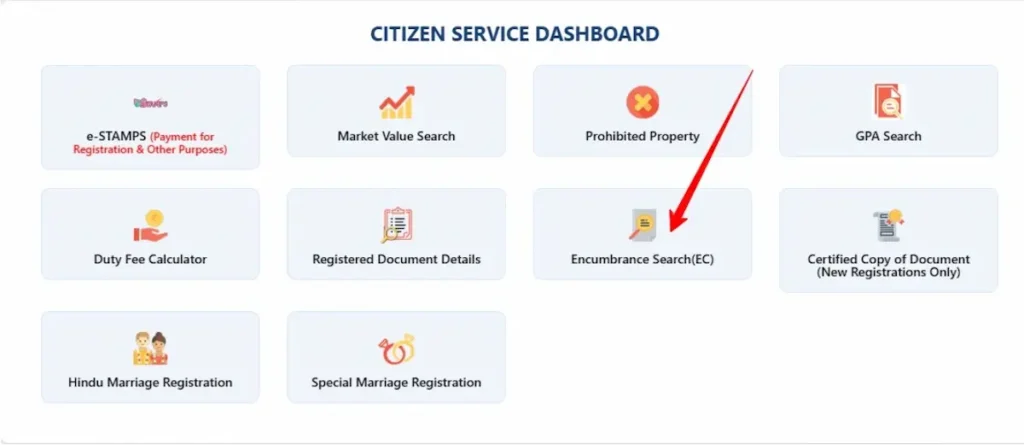
IGRS Telangana portal services overview.
How to Search for an EC on the IGRS Portal
You’ll need an account first. If you don’t have one, registration takes about few minutes — just your name, mobile number, email, and a password.
Step-by-Step Process
- 1. Go to registration.telangana.gov.in and log in as a “Citizen.”
- 2. Click “Encumbrance Search (EC)” under the Online Services menu.
- 3. Read the disclaimer page and hit Submit to move forward.
- 4. Choose your search method. You get three options:
- By Document Number — Best option if you have the previous registration/deed number and year. This pulls the most accurate results.
- By Property Details — Use this when you only have the survey number, house number, or village details.
- By Memo Number — For documents received from the registering SRO.
- 5. Fill in the required fields. For a property search, you’ll enter the district, SRO, village/locality, and either the survey number or house/door number.
- 6. Set the search period. You can go back as far as 1983 — that’s the earliest date for digitized records in Telangana. For a bank loan, set it to 30 years.
- 7. Enter the captcha and click Submit.
- 8. The Statement of Encumbrance appears on screen. You can view it for free, but downloading the official PDF costs money.
EC Fees in 2026
| Search Duration | Fee |
|---|---|
| Up to 30 years | ₹200 (approximately ₹225 with gateway charges) |
| More than 30 years | ₹500 (approximately ₹525 with gateway charges) |
How to Read Your EC Without Getting Confused
The EC statement can look dense, especially if the property has changed hands multiple times. Here’s what to look for:
- Transaction entries list each registered event chronologically — sale deeds, mortgage deeds, release deeds, gift deeds. Each entry shows the document number, year of registration, the SRO where it was registered, and the names of parties involved.
- A Nil Encumbrance Certificate means zero transactions were found for the period you searched. This doesn’t always mean the property is “clean.” It could mean the property is ancestral (passed down without formal registration), or all transactions happened before 1983 and aren’t in the digital system.
- Mortgage entries are the red flag most buyers look for. If a property shows an active mortgage but no corresponding release deed, the owner still owes money on it. Don’t proceed until you see a registered release/satisfaction deed.
- Court attachments and pending cases can also appear in the EC. But — and this is a big “but” — the EC only reflects registered transactions. Unregistered claims, verbal agreements, and pending litigation that hasn’t been formally recorded won’t show up. That’s exactly why property lawyers recommend a separate title search through court records in addition to the EC.
What the Online EC Doesn’t Show You
The IGRS portal’s digital records only go back to January 1, 1983. Anything before that date simply doesn’t exist in the online system. If your property’s last transaction was in 1978, the portal returns “No Records Found” — which isn’t the same as “this property is clear.” For pre-1983 records, you need to physically visit the jurisdictional Sub-Registrar Office and request a manual search of the physical Index Books.
The EC also won’t tell you about Section 22-A restrictions. Properties on the 22-A prohibited list — government land, Waqf properties, assigned lands, properties under court stays, and ceiling surplus lands — can’t be legally transferred. You should run a separate Prohibited Properties search on the IGRS portal before paying any token advance.
And it won’t show you pending property tax dues, municipal violations, or building plan approvals. The EC is strictly about registered encumbrances.
Common Problems (and How to Fix Them)
“Payment Deducted but EC Not Generated”
This is the single most common complaint. Your bank deducted the money, but the IGRS portal still shows “Pending.”
Don’t pay again. Wait at least two hours — the handshake between the bank server and the IGRS payment gateway can be slow. Go to the “Search Transaction” tool on the portal and enter your bank reference number or payment date. If the payment went through, the system will generate your E-Challan.
If it still shows pending after 24 hours, contact your bank for a reversal or email [email protected] with a screenshot of the payment.
“No Records Found” When Records Should Exist
This usually means one of three things: you’re on the wrong portal (IGRS vs. Bhu Bharati), you’ve selected the wrong SRO, or the property details don’t match what’s in the system. Spelling variations in village names and survey number formats cause most of these mismatches. Try searching by document number instead — it’s more reliable than property-based searches.
Also keep in mind that newly registered documents take 7 to 15 days to reflect in the EC database. If the sale deed was registered last week, it probably won’t appear yet.
Errors in the EC Itself
If the EC displays incorrect names, wrong survey numbers, or missing transactions, you can’t fix it online. Visit the relevant Sub-Registrar Office with the incorrect EC and your supporting documents. The SRO will verify and issue a corrected version — expect this to take 7 to 10 working days.
If the error involves the property’s boundaries or extent, that’s a bigger issue. Both the buyer and seller need to execute a Rectification Deed at the SRO. For clerical mistakes like spelling errors, the 2026 fee is around ₹100 for stamp duty plus ₹100 for registration. If the correction changes the property’s value, you’ll owe additional stamp duty on the difference.
EC for Agricultural Land: The Bhu Bharati Route
For agricultural land with transactions recorded after 2025, Bhu Bharati (bhubharati.telangana.gov.in) is where you need to go. This portal replaced Dharani and connects directly to GIS-based land maps for more accurate ownership data.
The process is slightly different. Log in using your mobile number and OTP. Go to “Land Details Search” under Information Services, then select your district, mandal, and village. For the most accurate results, use the property’s 11-digit Bhudhaar ID if you have it.
One thing to watch: the informational view on Bhu Bharati is free. The certified version that banks and courts accept carries a fee. And if you’re buying converted agricultural land, cross-check the “Land Nature” column in the Pahani record. If it says “Sarkari” or “Assigned” instead of “Patta,” that property can’t be legally sold to you regardless of what the EC says.
When You Need a Certified EC vs. an Informational One
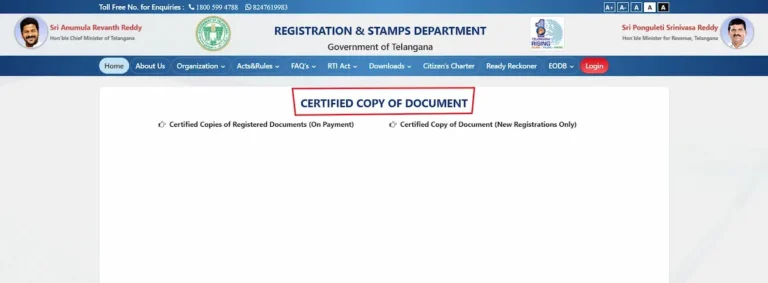
The free EC you can view on the IGRS portal is technically an “informational” version. It’s fine for preliminary checks — screening a property before you get serious about buying it. But for anything official — bank loan applications, court proceedings, property registration — you need the Certified EC. That’s the signed PDF version you get after payment. It carries a QR code and is treated as legally equivalent to a physical copy from the SRO. For high-value transactions, some lawyers recommend going one step further and getting a physical Certified EC directly from the Sub-Registrar Office. It carries the SRO’s stamp and signature, which some courts and older banks still prefer over digital versions.
NRIs: What You Can and Can’t Do Remotely
If you’re outside India, you can use the IGRS portal for EC searches, market value checks, and preliminary applications without any issues. But the moment you need to register a property or execute a deed, physical presence at the SRO is mandatory for biometric Aadhaar verification — there’s no exception to this in 2026.
The workaround? Execute a registered Power of Attorney in favor of a trusted representative in India. They can handle the SRO visit, biometric verification, and document signing on your behalf.
Before You Hand Over Any Money
Run this checklist before paying a token advance on any property in Telangana:
- Download the EC from the correct portal (IGRS for urban, Bhu Bharati for agricultural)
- Request a 30-year search — anything shorter might miss older mortgages
- Check the 22-A Prohibited Properties list for the survey number
- For agricultural or converted land, verify the Pahani record on Bhu Bharati
- Get the Certified EC (not just the free informational view) for your records
- Hire a property lawyer to do a separate title search through court records — the EC alone isn’t enough
The IGRS helpline is available at 1800-599-4788 (toll-free) for portal-related issues. For anything the helpline can’t resolve, your jurisdictional Sub-Registrar Office is the final authority.