IGRS Telangana CC Copy – Download Certified Copy Online (2026)
The IGRS Telangana portal at registration.telangana.gov.in offers two separate paths for downloading a Certified Copy (CC) — and picking the wrong one is the single biggest reason people waste time on this process. If your property was registered recently (2025–2026), you can grab a digitally signed copy for free using just your mobile number. But if your deed is older — say, from 2010 or 1995 — you’ll need the paid route through Meeseva, and that’s where things get tricky.
What Exactly Is a CC Copy in the IGRS Telangana System?
A Certified Copy (CC) is an officially authenticated duplicate of a registered property document — a sale deed, gift deed, mortgage deed, partition deed, or any other instrument registered at a Sub-Registrar Office (SRO) in Telangana. The legal backing comes from Section 76 of the Indian Evidence Act, 1872, which requires public officers holding registered documents to provide a true copy to any citizen who requests one and pays the prescribed fee.
Here’s the part most sites skip: a CC isn’t just a photocopy with a stamp. The digital version you download from IGRS carries a QR code and a digital signature. Banks across Telangana accept this PDF for home loan processing. Courts accept it as evidence. And if you’ve lost your original title deed, a CC is the first document your lawyer will tell you to obtain. That said, a CC doesn’t replace the original deed for registration purposes. You can’t register a new sale using only a CC. It’s proof, not a transferable instrument.
The Two Download Paths — Know Which One You Need
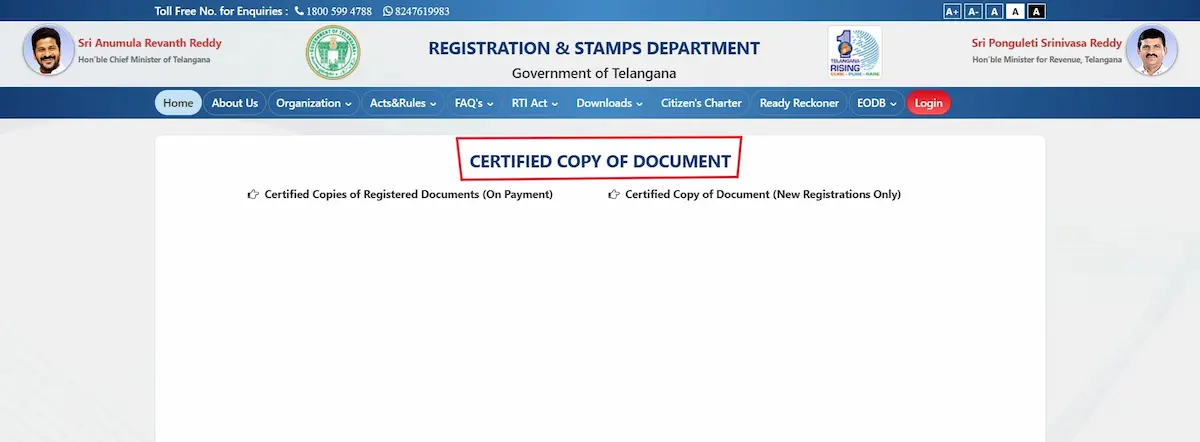
This is where almost every guide on the internet muddles things up. The IGRS Telangana portal lists two distinct options under the “Certified Copy” section. They look similar but work completely differently.
Path 1: Free Digitally Signed Copy (New Registrations Only)
This option is for documents registered recently — generally from 2025 onward, though some SROs have copies available for registrations dating back to 2022 or 2023. You don’t pay anything.
Here’s the exact process:
- Go to https://registration.telangana.gov.in/certifiedCopy.htm
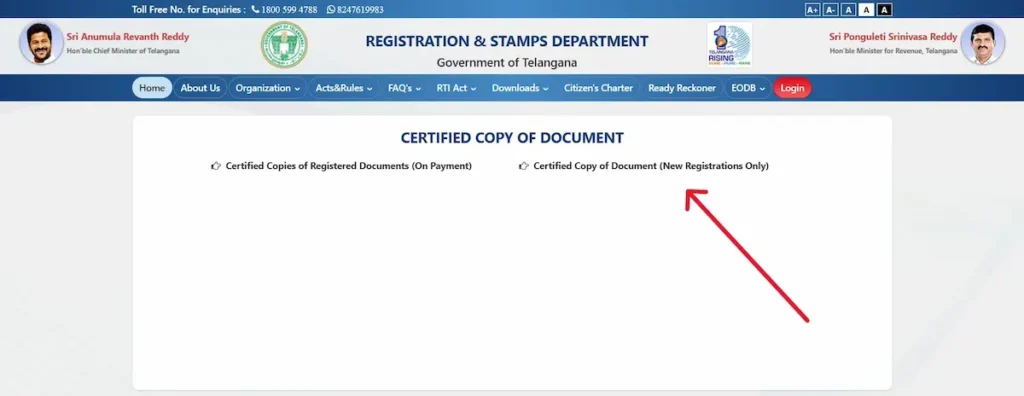
- Click on “Certified Copy of Document (New Registrations Only)”
- Enter the mobile number you used during property registration
- You’ll receive an OTP — enter it
- The system pulls up your registered document
- Download the PDF directly
That’s it. No login required. No Meeseva redirect. No fee.
But there’s a catch. This only works if the mobile number on file matches the one you’re entering. If you’ve changed your number since registration, or if the registration was done under someone else’s phone number (which happens more than you’d think), this path won’t work for you.
Path 2: Paid CC Through Meeseva (Older Documents)
For any property registered before the digital window — or when Path 1 doesn’t pull up your record — you’ll use the paid option. This one redirects you to the Meeseva portal.
Step-by-step:
- Visit https://registration.telangana.gov.in/certifiedCopy.htm
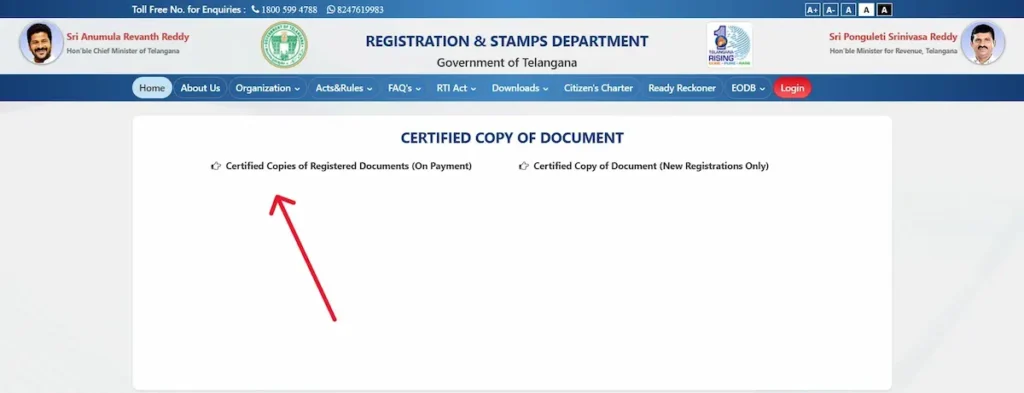
- Click “Certified Copies of Registered Documents (On Payment)”
- Log in with your IGRS citizen credentials (if you don’t have an account, you’ll need to register first — more on this below)
- You’ll be redirected to the Meeseva portal
- Enter these details about your document:
- District where the property was registered
- Sub-Registrar Office (SRO) name
- Document Number
- Year of Registration
- Verify that the details shown match your property
- Pay the fee online (debit card, credit card, net banking, or UPI)
- Save the acknowledgement receipt
- Wait for SRO verification — typically 1–2 business days
- Once approved, download the CC in PDF format
The fee varies based on the number of pages in your original document. It’s not a flat rate. For a standard 4–6 page sale deed, expect to pay somewhere between ₹50 and ₹200. The exact amount shows up on screen before you make payment, so there’s no guessing.
What Details Do You Need Before Starting?
This is where people get stuck. You sit down to download your CC and realize you don’t have the document number. Or you’re not sure which SRO handles your area.
Keep these ready before you open the portal:
| Required Detail | Where to Find It |
|---|---|
| Document Number | On your original registered deed (top right corner, usually) |
| Year of Registration | Same location on the deed |
| SRO Name | Use the “Know Your SRO/Village” tool on the IGRS homepage |
| District | Based on property location |
| Registered Mobile Number (Path 1 only) | The number used during original registration |
Don’t Have an IGRS Account? Here’s How to Register
Path 2 requires a citizen login. If you’ve never used the IGRS portal before, registration takes about 5 minutes.
Go to registration.telangana.gov.in, click “New User Registration,” select “Citizen” as your user category, and fill in your Aadhaar-linked details along with your mobile number. You’ll get an OTP for verification. Once done, your credentials work across all IGRS services — not just CC downloads. You can use the same account for Encumbrance Certificate searches, market value lookups, slot bookings, and e-stamp purchases.
One login. All services. That part actually works well.
The 1983 Problem — Why Your Document Might Not Show Up
If you search for a document and the portal returns “No Records Found,” don’t panic. But also don’t assume something shady happened with your property.
Telangana’s digital records on the IGRS portal generally go back to 1983. Some SROs have digitized records as far back as 1999 or even earlier, but that’s not consistent across all 33 districts. If your property was last transacted before 1983 — or even before 2000 in some areas — the online system simply won’t have it.
In that case, you need a Manual CC. This requires a physical visit to the SRO. And here’s the hard part: you’ll need to provide the Volume Number and Page Number from the original physical register. SRO staff will manually locate the entry in their index books, verify it, and issue a physically signed copy.
Manual CCs take 10–15 working days. There’s no way to speed this up from home.
Common Errors and How to Fix Them
After going through dozens of user complaints and forum threads, here are the issues that come up again and again:
- “Document details do not match” — This almost always means you entered the wrong SRO name. Property boundaries and SRO jurisdictions have shifted over the years. A property in Kukatpally might fall under a different SRO than you’d expect. Use the “Know Your SRO” tool to confirm.
- Payment went through but no acknowledgement — Don’t make the payment again. Wait 24 hours. Check the “Fee Payment Status” tool on the portal using your bank transaction reference number. If the payment was captured, your receipt will show up. If it wasn’t, your bank will reverse the amount within 5–7 working days.
- OTP not received (Path 1) — The OTP goes to the mobile number on file from the original registration — not your current number. If you’ve switched numbers, Path 1 won’t work for you. Use Path 2 instead.
- Login issues after registration — Try clearing your browser cache. The IGRS portal sometimes has session conflicts if you have multiple government portals open in the same browser. A private/incognito window often fixes this.
- CC approved but PDF won’t download — Some users report issues with mobile browsers. The portal works best on a desktop browser — Chrome or Firefox. If you’re on your phone, switch to desktop mode in your browser settings.
Is the Digitally Signed CC Legally Valid?
Yes. Completely. A digitally signed Certified Copy downloaded from the IGRS Telangana portal holds the same legal weight as a physical copy issued at the SRO counter. Banks accept it for home loan processing. Courts accept it as documentary evidence. Revenue offices accept it for mutation and transfer proceedings.
The PDF contains a QR code that anyone — a bank officer, a lawyer, a buyer — can scan to verify its authenticity against the IGRS database. That’s actually more secure than a physical copy, which can be forged.
What If You’ve Lost Your Original Deed?
A CC becomes critically important if your original registered document is lost or destroyed. But you can’t just download a CC and call it a day. There’s a proper protocol:
- First, file a police FIR at your local station reporting the loss. This creates an official record and prevents potential misuse of the original.
- Second, publish a notice in a regional daily newspaper declaring the loss. This puts the public on notice.
- Third, apply for a CC through the IGRS portal (Path 2) or visit the SRO directly. The CC, combined with the FIR and newspaper notice, creates a legally recognized paper trail that protects your ownership claim.
A Quick Note on Fees vs. Stamp Duty
Some first-time users confuse the CC fee with stamp duty. They’re completely unrelated.
The CC fee is a small charge — based on page count — that you pay to obtain a copy of an already-registered document. Stamp duty, on the other hand, is the 6% government levy you pay when registering a property transaction. The April 2025 revision of circle rates in Telangana increased stamp duty calculations significantly in areas like Gachibowli, Tellapur, and Kokapet (with jumps of 30–50% in some corridors). But none of that affects your CC download cost.
Helpline and Support
If you’re stuck at any point, the Registration and Stamps Department has a toll-free helpline: 1800 599 4788. There’s also a secondary number: 8247619983. For written queries or grievances, email [email protected]. And for quick queries, there’s a WhatsApp number: 91212 20272.
Response times vary. Phone support is fastest for payment and login issues. Email works better for document-specific problems where you need to attach screenshots.
Your Next Step
If you already have your document number and SRO details handy, go straight to https://registration.telangana.gov.in/certifiedCopy.htm and start the process — it genuinely takes under 10 minutes for recent registrations. For older documents, budget a couple of days for SRO verification after payment. And if your property predates 1983 in the digital records, plan a physical SRO visit with the volume and page numbers from your original deed.
The system works. It’s just that nobody tells you which of the two doors to walk through.